
As gamers, we know how annoying repetitive clicking can be when you just want to enjoy a game.
From collecting resources to earning in-game currency and repeating actions, a good auto clicker saves time and effort.
To find the best options, our team spent over 100+ hours testing 19 different auto clickers across popular games like Cookie Clicker, Minecraft, and several mobile games from action, role-playing, and strategy categories.
Each tool was tested using a clear scoring system that focused on customization options, click accuracy, and macro recording performance.
We paid special attention to reliability and anti-cheat detection to ensure our recommendations work effectively regardless of your gaming preferences..

Best Auto Clicker for Games
1. IO Auto Clicker
IO auto clicker stands out in the market due to its virus-free and safe download, making it a reliable tool for automating mouse clicks.
Key Features of the tool
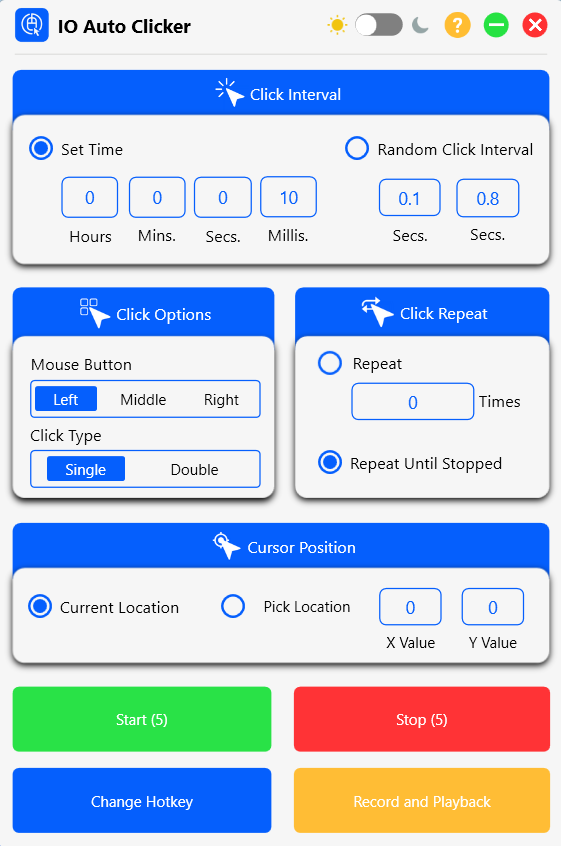
- Adjustable Click Interval: One of the key features of our program is the ability to control the time elapsed between two consecutive clicks. Users can set this interval to be fast or slow based on their requirements, with time divisions into hours, minutes, seconds, and milliseconds.
- Multiple Click Options: Users can choose between left-click or right-click, and single, double, or triple clicks. These options make it a versatile tool for various applications.
- Click Recording and Playback: Users can record and playback sequences of up to 100 clicks in numerical order. This feature is especially useful for games and other incremental applications.
- Target Point Selection: The program offers the option to set specific target points on the screen where the clicker will automatically click.
- Customizable Hotkeys: Users can set their preferred keyboard shortcuts to start and stop the program instantly.
- Cross-Platform Availability: Available across Mac, Windows, Chromebook, Android, and IOS, making it the ideal choice for gamers regardless of their device preference.
Additional Benefits:
- Continuous automation of mouse clicks on any screen location
- Ideal for winning games like Minecraft and Roblox
- Fast clicks for quicker punches and sword swings in games
- Useful for data entry tasks such as form filling and data cross-checking
- 100% safe and free auto clicker software
Pros
✔ User Interface
Simple and intuitive user interface perfect for beginners
✔ Precise Control
Customizable click intervals for precise control over timing
✔ GPU Usage
Lightweight design with minimal system resource usage
✔ Click Support
Supports both single and double-click automation
Cons
✘ Cross-Platform Limitations
Cannot sync between different devices, requiring separate setup on each system.
2. GS Auto Clicker
GS Auto Clicker is a free task automation software that saves you from the hassle of repeatedly clicking on the screen.
It is often used in the gaming genre ‘idlers’. It is perfect for tasks that require you to tap a character or perform a specific task thousands of times, minimizing bodily wear and tear.
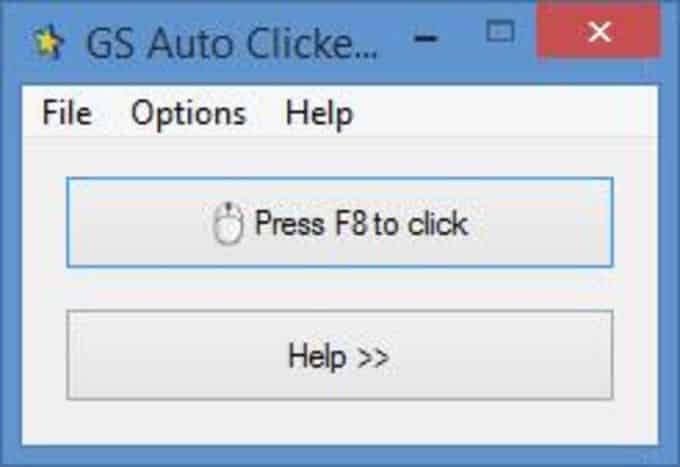
Key Features of the tool
- Programmable Click Patterns: Users can create custom mouse click patterns to automate complex sequences of actions.
- Macro Creation: Apart from basic clicking, GS AutoClicker allows users to create macros for more sophisticated automation tasks.
- Screen Recording: The software includes functionality to record screen activities, which can be useful for creating tutorials or documenting processes.
- Hotkey Customization: Users can set their preferred keyboard shortcuts for quick access to various functions.
- Keyword Insertion and Phrase Repetition: The program can automatically type specified keywords or repeat phrases, adding another layer of automation beyond just clicking.
- Sequence Management: GS Auto Clicker offers expanded capacity for managing and storing multiple automation sequences.
- User-Friendly Experience: It is easy to use, free of harmful codes, and doesn’t display disruptive ads or subscription requests. However, it has limited functionality and aims to target a particular problem area for Windows users.
Pros
✔ Advanced Sequence Recording
Records and replays complex multi-step click patterns
✔ Text Automation
Inserts custom text and repeats phrases automatically
✔ Ad-Free Experience
No intrusive advertisements or subscription prompts
Cons
✘ Basic Interface
Basic UI may lack visual appeal for some of the users.
✘ No Dark Mode
Lacks dark mode that many gamers prefer for extended night sessions.
3. MurGaa Auto Clicker
Murgaa is a versatile tool that can perform various functions on your computer with ease. It saves you from the tedious task of clicking repeatedly, making it ideal for gaming and official purposes.
Key Features of the tool
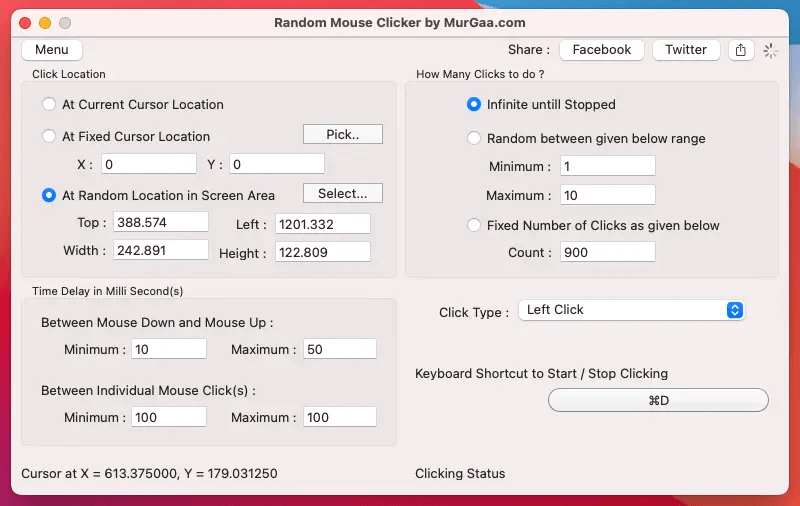
- Multi-Button Support: The software provides comprehensive mouse button functionality including left-click, right-click, middle-click, 4th and 5th mouse button clicks, and mouse up/down actions for both left and right buttons.
- Location Control: Users can save specific cursor locations and return to them during automated sequences, providing precise control over where clicks occur.
- Click Type Option: Murgaa supports both single-click and double-click functionality, allowing users to automate different types of interactions required by various games.
- Mouse Movement Automation: The software can automatically move the mouse cursor, with the added capability to vary cursor direction for more natural-looking automation.
- Random Location Clicking: As seen in the image, Murgaa can click at random locations within a specified screen area, which is particularly useful for games that detect perfectly regular clicking patterns.
- Time Delay Customization: Users can set minimum and maximum delay times between mouse actions, adding randomization that helps avoid detection in games with anti-cheat systems.
- Keyboard Shortcut Control: The software allows users to set custom keyboard shortcuts to start and stop clicking operations quickly during gameplay.
Pros
✔ Randomization Features
Records and replays complex multi-step click patterns
✔ Comprehensive Control
Supports both infinite clicking and preset click counts
✔ Visual Area Selection
Graphical interface for defining click areas with precise coordinate control
Cons
✘ Basic UI Design
Interface appears dated compared to more modern auto clickers
✘ No Dark Mode
Missing dark theme option preferred by gamers.
4. OP Auto Clicker
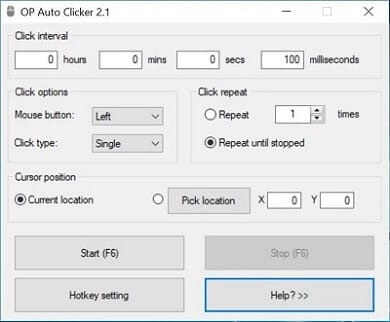
OP Auto Clicker 4.0 is a user-friendly clicker program that has a straightforward interface.
Key Features of the tool
- Click Location Options: This software has two methods of clicking. You can either click on the screen where you left your cursor last, or you can specify a particular location for repeating the clicks.
- Click Repetition Control: There are two types of clicking options – you can either set a specific number of clicks or allow it to click infinitely until you manually stop it.
- Time Interval Settings: It is recommended to give a time interval between clicks, with options to set hours, minutes, seconds, and milliseconds as seen in the image.
- Mouse Button Selection: The clicker has the option to configure your mouse clicks using left, right, or middle buttons.
- Click Type Customization: Users can choose between single, double, or triple-clicking options based on their needs.
- Hotkey Configuration: The software allows users to customize keyboard shortcuts for convenient control during gaming.
- Automatic Settings Saving: Settings are saved automatically, eliminating the need to reconfigure the program each time it’s launched.
Primarily, OP is used for gaming. Some popular ones are cookie clicker, clicker heroes, realm grinder, and even Minecraft. This auto clicker is available on Windows and can be downloaded easily.
Pros
✔ Minimalist Interface
Simple, straightforward design that’s easy to understand and operate quickly
✔ Open-Source Reliability
Transparent code base with community oversight ensures security and regular improvements
✔ Virus Free with No Ads
100% virus-free with zero advertisements or unwanted toolbars.
Cons
✘ Limited Location Options
Lacks area selection for random clicking within defined regions
✘ Limited Customisation Options
Missing advanced features like randomisation and complex sequence recordingRetry
5. Perfect Automation
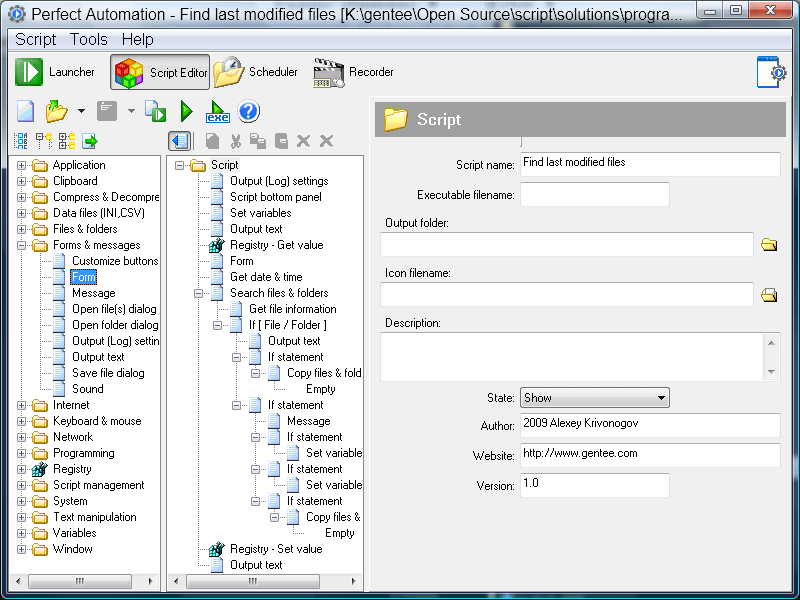
This is a free auto clicker software that helps gamers save time and prevent the hassle of continuously clicking. It is equipped with modern features such as a powerful script editor, scheduler, and launcher.
Key Features of the tool
- Comprehensive Automation Environment: As a launcher, script editor, and mouse and keyboard recorder, it is the best auto clicker for Roblox games that require high levels of clicking.
- Advanced Scheduling: Perfect Automation offers scheduling capabilities for clicking processes, allowing users to plan and execute automated tasks at specific times.
- Complete Input Recording: The software can record both keyboard and mouse activities, capturing complex sequences of actions for later replay.
- Script Creation and Editing: Users can create, edit, and customize automation scripts with the built-in script editor, as shown in the detailed interface image.
- Hotkey Activation: Quick launch of automation sequences is possible through user-defined hotkeys for efficient gaming.
- Visual Programming Interface: The image shows a comprehensive visual interface with folder structures and script components for building complex automation workflows.
- File System Integration: Perfect Automation can interact with the file system, allowing scripts to find and manipulate files as part of automation sequences.
Pros
✔ Enterprise-Level Functionality
Offers professional-grade automation features typically found in business software
✔ Visual Scripting System
Provides graphical programming interface that doesn’t require coding knowledge
✔ Conditional Logic Support
Includes if/then statements for creating intelligent, responsive automation scripts.
Cons
✘ Learning Curve Complexity
More advanced interface requires additional time to master compared to simpler auto clickers.
✘ Resource Intensive
Full-featured automation suite requires more system resources than lightweight alternatives.
6. PTFB Pro
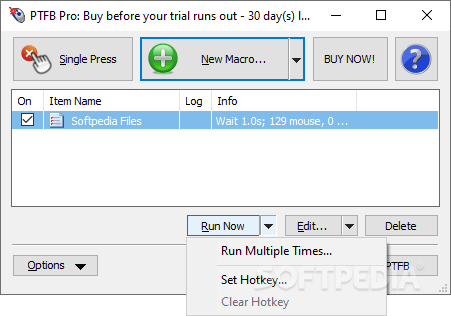
PTFB Pro is an advanced clicker application designed to keep users’ workflows uninterrupted and productive. Its automation capabilities eliminate the need for manual clicks and automate workflow operations. This helps in reducing unnecessary clicks.
Key Features of the tool:
- Software Automation: Unlike other basic auto clickers, PTFB Pro offers powerful professional-grade automation for Windows operations that require clicking actions. It automates mouse clicks and keyboard strokes for various tasks.
- Prompt Response System: A standout feature is its ability to automatically respond to software prompts and pop-ups, handling dialog boxes and information requests without user intervention.
- Program Management: The software can restart unresponsive programs automatically, prevent programs from running during specified times, and restart programs consuming excessive processing power.
- Settings Preservation: PTFB Pro can restore preferences and window state automatically, maintaining your workflow exactly as you left it.
- Multi-Function Capability: This program is used for automation testing, data entry, form filling, and other repetitive actions beyond simple clicking.
- Security Features: It includes advanced features like password protection for security, ensuring your automation scripts remain private.
- Network Compatibility: The software supports shared networks, making it suitable for team environments and enterprise settings.
- Background Operation: PTFB Pro operates even when the system is locked, allowing automation to continue without active monitoring.
Pros
✔ Enterprise-Level Functionality
Industry-level capabilities suitable for business and professional environments
✔ Security Integration
Password protection and access controls for sensitive automation tasks
✔ System-Wide Operation
Functions seamlessly when system is locked, enabling 24/7 automation
Cons
✘ Learning Curve
Challenging for non-technical users with outdated design elements
✘ Premium Pricing
Not free, with cost starting at $39.99 after 30-day trial period
7. Speed Auto Clicker
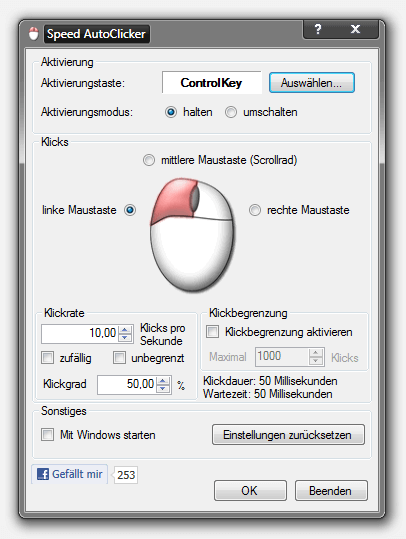
Speed Auto Mouse Clicker is a tool that provides all the necessary features to enable the fastest mouse clicks. The software offers a mode change between toggle & hold and a free selectable activation key, making it perfect for a relaxed gaming session.
Key Features of the tool:
- Activation Controls: Speed AutoClicker offers flexible activation options through customizable hotkeys (shown as “ControlKey” in the interface) with toggleable activation modes.
- Mouse Button Selection: Users can choose which mouse button to automate – left, middle scroll wheel, or right mouse button, visually represented by an interactive mouse graphic in the interface.
- Click Rate Customisation: The software allows precise control over clicking speed with options to set clicks per second (10.00 shown in the image) for optimal performance in different gaming scenarios.
- Click Limitation Settings: Users can set maximum click limits (up to 1000 clicks shown) to prevent excessive clicking and better control automation sessions.
- Timing Parameters: Fine-tune your clicking with adjustable click duration and wait time settings (both shown as 50 milliseconds), allowing for natural-feeling click patterns.
- Randomisation Option: The interface includes a randomization checkbox to vary click timing and avoid detection in games with anti-cheat systems.
Pros
✔ Precision Click Control
Offers exact click speed settings down to decimal points for perfect gaming rhythm
✔ Visual Configuration
Interactive mouse graphic makes button selection intuitive and user-friendly
✔ Flexible Operation Modes
Toggle between hold-to-click and switch-on/off modes for different gaming needs
Cons
✘ Basic Design
Simple design that lacks the modern aesthetic appeal.
✘ Limited Advanced Features
Missing macro recording and complex sequence automation optionsRetry
8. Auto Mouse Click
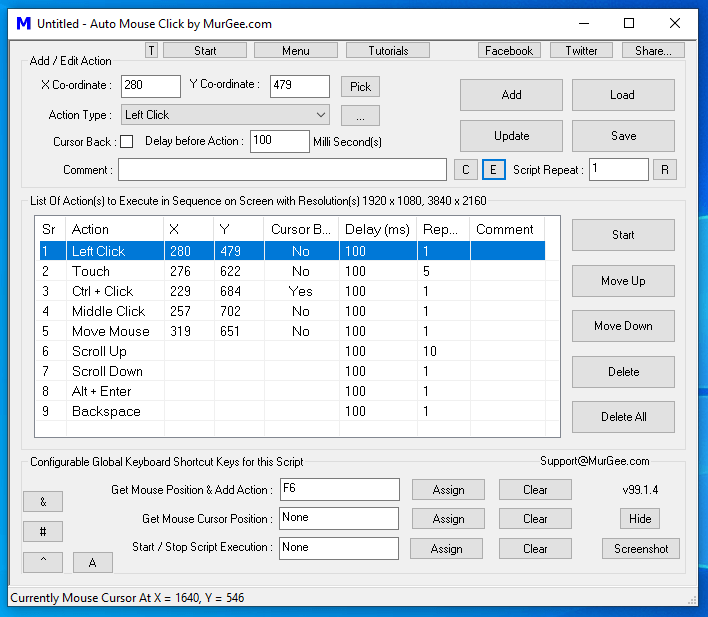
With this awesome and free auto clicker, you can put rest to your fingers and wrist as the clicker will do the job efficiently.
You can specify the locations and can choose the number of clicks.
Also, specify a sequence of clicks if you want to click on different locations. The interface is not so user-friendly and there are a lot of advanced settings in this auto clicker so you might take some time to figure it all out.
Pros
✔ Complete Automation Suite
Combines mouse actions, keyboard commands, and movement controls in one interface
✔ Sequence Visualization
Tabular display makes complex action sequences easy to understand and modify
✔ Multi-Action Support
Handles everything from simple clicks to complex combinations of inputs and movements
Cons
✘ Complex Interface
Feature-rich design may initially overwhelm casual users
✘ Manual Coordinate Entry
Requires understanding of screen coordinates for precise positioning of the mouse
9. Free Mouse Clicker
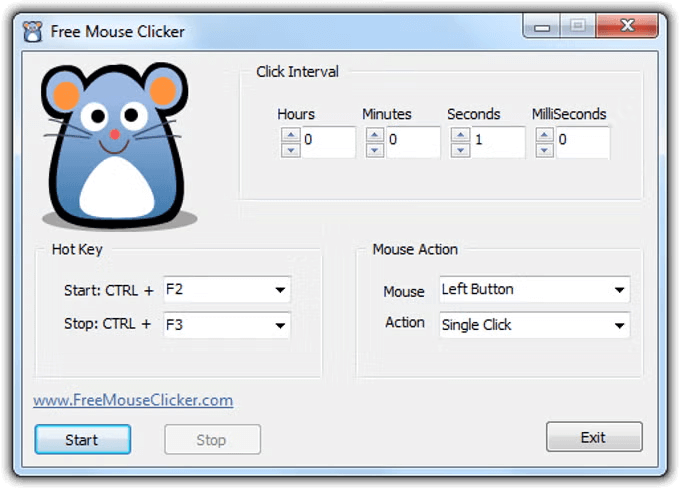
A CPU friendly auto mouse clicker that lets you specify the mouse action like the click type and single click or double click.
Key Features of the tool
- Basic Click Automation: Free Mouse Clicker offers simple automation for mouse clicks with an easy-to-understand interface featuring a cute mouse character design.
- Time Interval Control: Users can adjust click intervals with precise control over hours, minutes, seconds, and milliseconds using intuitive up/down controls.
- Custom Hotkey Settings: The software allows users to set custom keyboard shortcuts for starting and stopping the auto-clicking function, with default options of CTRL+F2 and CTRL+F3.
- Mouse Action Options: Users can select which mouse button to use (Left Button shown in the image) and the type of action (Single Click shown) for their automation needs.
- One-Click Operation: Simple Start, Stop, and Exit buttons make controlling the application straightforward even for first-time users.
Pros
✔ Beginner-Friendly Design
Simple interface with cute mascot makes it approachable for all users
✔ Quick Setup
Ready to use immediately with minimal configuration required
✔ Zero Learning Curve
Can be mastered in seconds without reading instructions or tutorials
Cons
✘ Limited Advanced Features
Missing record/playback functionality and location targeting options
✘ No Dark Mode
Missing dark mode for the those late night gaming sessions.
What to Look for in an AutoClicker for Gaming ?
1. Clicking Options
During testing, we saw that precision makes a big difference. The best auto clickers allow you to adjust click speed (from 1 to 1000+ clicks per second), control how long each click lasts, and add random timing between clicks to make automation feel more natural.
Games respond differently to clicking patterns, so this level of control proved essential across different gaming scenarios. The difference between winning and losing often came down to having the right clicking pattern.
2. Mouse movement Control
You should prioritize auto clickers that offer comprehensive mouse movement options, not just clicking in one spot.
The top performers in our tests offered predetermined movement paths, random movement within specified zones, coordinate-based positioning, and natural movement simulation with slight variations.
This feature in particularly valuable in RPGs and strategy games where resource gathering requires moving between multiple locations.
Without good movement control, many automation tasks become impossible in more complex games.
3. Hotkeys:
We focused on auto clickers that let you fully customize keyboard shortcuts, use toggle controls instead of holding a key, switch profiles quickly, and stop clicks instantly when needed.
These features make it easy to control the auto clicker during gameplay without opening menus. Being able to start, stop, or change settings instantly helped keep the game flow smooth during testing.
4. Compatibility:
When purchasing an auto clicker, carefully consider compatibility with your favorite games. Not all auto clickers work with every game.
Our comprehensive testing across different game engines revealed some excel with browser-based games, while others work better with specific game engines.
Compatibility with anti-cheat systems varies significantly, and mobile compatibility requires special considerations.
5. Ease-of-use:
You should look for an auto clicker with an intuitive interface that doesn’t require a computer science degree to operate.
The learning curve varied dramatically between products in our testing. We prioritized auto clickers that offer intuitive controls and clear visualizations.
Even powerful features are worthless if they’re too complicated to use effectively. The best auto clickers balanced powerful functionality with accessibility.
6. Security:
Be extremely careful about security risks. We carefully evaluated each tool’s safety profile, including code signature verification, update frequency and developer reputation.
We excluded several tools with suspicious behavior or unnecessary system access requests. Run a virus scan before installing anything on your system.
7. Support:
You should consider the quality of support when choosing an auto clicker, as this can make or break your experience.
When problems arose during testing, responsive support made all the difference. Look for quality documentation and tutorials, community forums and troubleshooting resources, developer responsiveness to issues, and regular updates and improvements.
This factor proved especially important for less experienced users or those using auto clickers with complex games. Good support can turn potentially frustrating experiences into productive ones.
Frequently Asked Questions
Q1. What is the best auto clicker for gamers?
Ans. IO Auto Clicker, GS Auto Clicker, and Fast Mouse Clicker are some of the preferred clickers for gaming.
Q2. What’s the safest auto clicker?
Ans. When it comes to safety, it is important to download the application from trusted sources and to use antivirus software to scan them.
Some clicker programs that are generally considered safe include Auto Mouse Click and IO Auto Clicker.
Q3. What auto clicker has a virus?
Ans. It is not appropriate to single out a specific software and accuse it of having a virus as safety can vary depending on the version, source, and installation method.
However, it’s important to be cautious when downloading such software from untrusted sources.
They may contain viruses, malware, or other harmful software that can damage your computer or compromise your security. Always use reliable antivirus software to scan any downloaded files before installing them.
Q4. Is there a real auto clicker?
Ans. Yes, there are many real auto clicker programs available for download.
Auto clickers are software programs that can simulate mouse clicks and keystrokes. This allows users to automate repetitive tasks.
Q5. What is the best PC AutoClicker?
Ans. Some of the best auto clickers for PC include GS Auto Clicker, Fast Mouse Clicker, and IO Auto Clicker.
Conclusion
Autoclickers are incredibly useful tools. For gamers, data entry workers, or anyone looking to automate repetitive mouse-clicking tasks, autoclickers can be a life savior.
With a wide range of customizable features available, you can easily set up an auto clicker to suit your specific needs.
The IO Auto Clicker is an excellent choice if you want to automate mouse-clicking tasks and increase your productivity.

I love playing incremental games and creating tools & software. Connecting both my passions, I wrote down the code for Auto clicker and published it for free for you all on wordpress-880390-5387831.cloudwaysapps.com, feel free to reach out to me on hey@wordpress-880390-5387831.cloudwaysapps.com to suggest new features and suggestions.